Have questions about ParkClear? Find answers about how the ParkClear parking app works, parking rules, location-based parking guidance, parking sign analysis, account features, privacy, and more.
What is ParkClear?
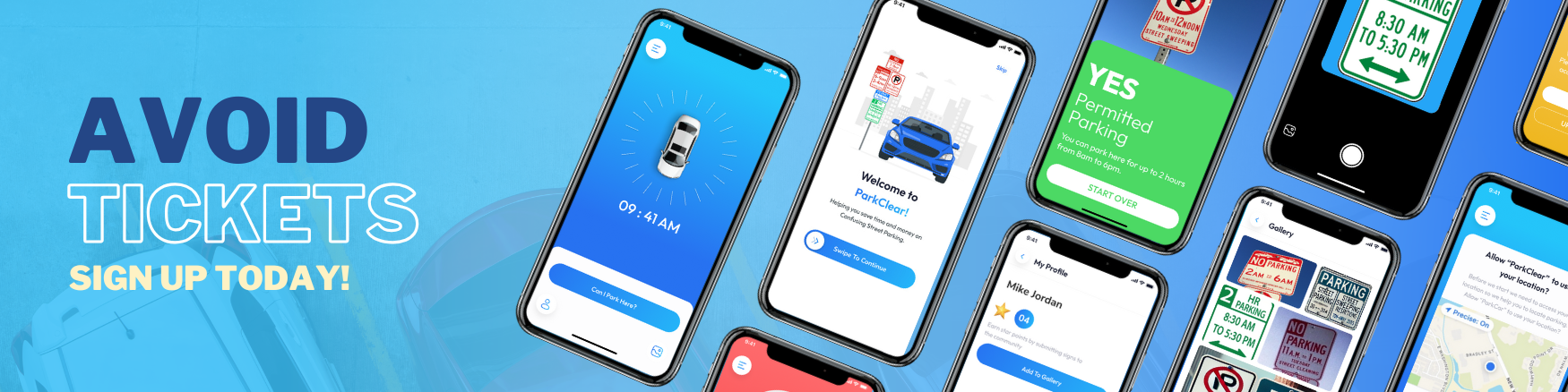
ParkClear is a smart street parking app that helps drivers understand confusing parking signs and determine whether parking is allowed at a specific location. Using location-based technology and image recognition, ParkClear provides clear “Yes” or “No” parking guidance to help drivers make faster, more confident parking decisions.
How does ParkClear work?
ParkClear uses location-based technology, parking sign analysis, and personalized parking information to help drivers make clearer parking decisions.
- Location-Based Parking Decisions: ParkClear uses your device’s location to identify applicable parking rules and provide a clear “Yes” or “No” parking decision.
- Parking Sign Photo Analysis: When more information is needed, take a photo of nearby parking signs. ParkClear analyzes the signs to help determine whether parking is allowed.
- Parking Expiration Alerts: Set a personalized alert so ParkClear can remind you when it’s time to move your car.
- Future Parking Decisions: Planning ahead? Select a future date and time and provide the parking sign information needed for ParkClear to help determine whether parking will be allowed.
How do I know if I can park on a street?
ParkClear helps you determine whether parking is allowed at a specific location and time. Using location-based technology and parking sign analysis, ParkClear interprets applicable parking rules and provides clear, easy-to-understand parking guidance. Simply check your location in the ParkClear app to make a faster, more confident parking decision.
Can ParkClear help me understand confusing parking signs?
Yes. ParkClear is designed to simplify confusing street parking signs and complex parking rules. Using image recognition and location-based information, ParkClear analyzes the parking restrictions that apply to your location and turns them into clear guidance, so you can spend less time deciphering signs and more time parking with confidence.
Can ParkClear help me read street parking signs?
Yes. ParkClear uses image recognition technology to help interpret street parking signs and make complicated parking restrictions easier to understand. When multiple rules, time limits, or restrictions apply, ParkClear helps simplify that information into clear parking guidance for your location.
How do I get started with ParkClear?
- Download ParkClear: Get the app from the Apple App Store or Google Play.
- Open the App: Follow the on-screen instructions to get started.
- Allow Permissions: Enable location and camera access so ParkClear can provide location-based parking guidance and analyze parking signs when needed.
- Check Your Parking: Use your current location to get a clear “Yes” or “No” parking decision. When needed, take a photo of nearby parking signs for additional analysis.
Is ParkClear free to use?
Yes. ParkClear offers a free, ad-supported version with access to core parking assistance features. New users also receive a 30-day ad-free trial. For drivers who want additional features, ParkClear Pro offers premium tools such as Parking Expiration Reminders, customized future date and time parking decisions, and an ad-free experience.
What devices are compatible with ParkClear?
ParkClear is available for compatible iPhone and Android devices through the Apple App Store and Google Play. For the most current operating system and device requirements, please check the ParkClear listing in your device’s app store before downloading.
Do I need an internet connection to use ParkClear?
Yes. ParkClear requires an active internet connection to provide parking guidance, analyze parking signs, and access current parking information. For the best experience, make sure your device has a reliable Wi-Fi or cellular data connection while using the app.
How accurate is ParkClear’s parking information?
ParkClear is designed to provide clear, reliable parking guidance using location-based information, parking rules, and parking sign analysis. Because parking regulations, temporary restrictions, and street signage can change, drivers should always check posted signs and local parking rules before leaving their vehicle. ParkClear provides parking guidance to help you make a more informed parking decision.
How does ParkClear protect my privacy?
ParkClear takes your privacy seriously and uses technical and organizational security measures to help protect your personal information. We collect and use information such as location data, account information, device data, and user-submitted content as needed to provide, personalize, secure, and improve ParkClear’s services. We may also work with trusted service providers and other third parties as described in our Privacy Policy. For complete details about the information we collect, how it is used and shared, and your privacy choices, please review our Privacy Policy.
Can I use ParkClear internationally?
ParkClear is currently designed for use in the United States. Parking laws, signage, and regulations vary by country, so ParkClear’s parking guidance should not be relied upon outside supported U.S. locations. As ParkClear expands, we plan to support additional regions and will provide updated coverage information as it becomes available.
What should I do if ParkClear gives me an incorrect parking status?
If ParkClear provides a parking status that appears incorrect, always follow posted parking signs and local parking regulations. Then, please report the issue so we can review the information and continue improving ParkClear.
- Verify the Signs: Check nearby parking signs, posted restrictions, and temporary notices for the most current information.
- Report the Issue: Use ParkClear’s in-app reporting feature to let us know about the discrepancy.
- Contact Support: If you need additional assistance, contact the ParkClear support team and provide details about the location and issue.
How do I create and manage my ParkClear account?
- Create an Account: Open ParkClear and follow the on-screen instructions to create your account.
- Manage Profile: Access your account settings in the ParkClear app to manage your available profile information, preferences, and account settings.
Why do I see ads in ParkClear?
ParkClear’s free version may display advertisements that help support the development and operation of the app. Users who prefer an ad-free experience can access it through ParkClear Pro. Advertising and data practices are described in our Privacy Policy.
Is ParkClear available in multiple languages?
ParkClear is currently available in English. We may expand language support in the future as ParkClear grows and becomes available to more drivers and communities.
What permissions does ParkClear require on my device?
ParkClear may require certain device permissions to provide its parking assistance features:
- Location Services: Allows ParkClear to determine your location and provide location-based parking guidance.
- Camera Access: Allows you to take photos of nearby parking signs for analysis when needed.
- Notifications: Allows ParkClear to send alerts and reminders when you enable features that use notifications.
- Internet Access: ParkClear requires Wi-Fi or cellular data to process information and provide current parking guidance.
You can manage ParkClear’s permissions at any time through your device settings. Disabling certain permissions may limit some app features.